-
Log into the EverConnect Portal.
-
Navigate to the Leads page.
-
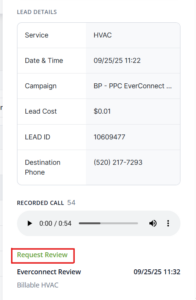
Click on the Lead you want to dispute. This will open the call details.
-
Click on Request Review
-
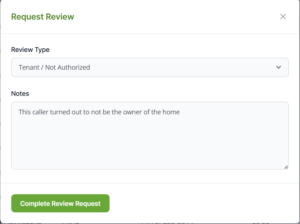
Add the Review Type
-
Duplicate → the lead is from the same caller or household that already called less than 14 days ago
-
Tenant / Not Authorized → the caller is not authorized to schedule an appointment (e.g. a renter)
-
Outside Service Area → the caller is asking for service outside the BPR/FSR coverage area or coverage area specified by the digital client
-
Invalid Contact Information → e.g. the call goes to voicemail and upon returning the call, the client realizes they cannot service the caller
-
Service not offered → the caller is asking for a service that falls outside of the general line of work (e.g. calling a roofer for a siding repair)
-
Other → all other disputes
-
-
Add any relevant Notes
-
Share as much context as possible to help the review team understand the dispute
-
-
Click Complete Review Request
-
The lead notes will update for you immediately and will sync to the admin view within the next 15 minutes.
-
The dispute will be reviewed by our admin team within the next 7 days.
-
After the lead dispute is reviewed, you will see the EverConnect Review note appended to the lead.
-
If the dispute is accepted, the Lead Cost will change to $0.00

-